Shared Voicemail Setup
One thing I'd like to push forward on is the request to make a shared or Call Queue VM a lot easier on Viirtue. While I always love working on Viirtue/Netsapiens sites, as they are generally easier to use, creating a shared VM or Call Queue VM is SO much easier on ACO/RingCentral.
Is there any possible way to push this request upwards? Having to follow a General Voicemail guide each time is a lot of work, especially when this is a common request we receive. Configuring something like this on ACO/RingCentral takes less than 5 minutes and is handled through easy-to-navigate menus, not backend phoneline appearance tweaks.
Comments: 4
Oldest
•
Newest
•
Most likes
•
Fewest likes
-
22 Apr
Christian KarrenHighlighted comment
Also one thing I have found is the Shared General Voicemail Box user (500) for example does not work with Coordless phones only deskphones. -
21 Dec, '23
Carlos Gaston AdminCan you please provide us an example on how this is intended to work? If you have some screenshots from Ring Central that would be great! Thank you!
EXAMPLE
-------------------------------------------------------------------
Description:
The NetSapiens portal allows for custom contacts to be created/imported and used via the WebPhone or Portal. When using MobileConnect it would be nice to have the same functionality.
Acceptance Criteria:
- MobileConnect allows for viewing Portal Contacts
- MobileConnect allows for calling & sms of Portal Contacts
Nice-to-Have:
- MobileConnect allows for managing Portal Contacts (Create, Update, Delete)
Problem Being Solved:
Some clients utilize the Portal Custom Contacts as well as the Shared Contacts in GoVoip, Portal & WP itself. When using MobileConnect this feature is missing.
It would be nice to have this functionality available in MobileConnect to keep feature parity. -
03 Jan, '24
Jared DCertainly Carlos!
Description:
The NetSapiens portal currently requires backend phoneline appearance changes in order to set up a shared VM extension. It would be much more helpful to have this in an easy-to-follow menu format.
Acceptance Criteria:
- Message-Only Extension whose messages can be easily shared with others
Problem Being Solved:
The amount of time and troubleshooting it takes to make one shared message extension is a huge lift, especially for sites that have multiple of them.
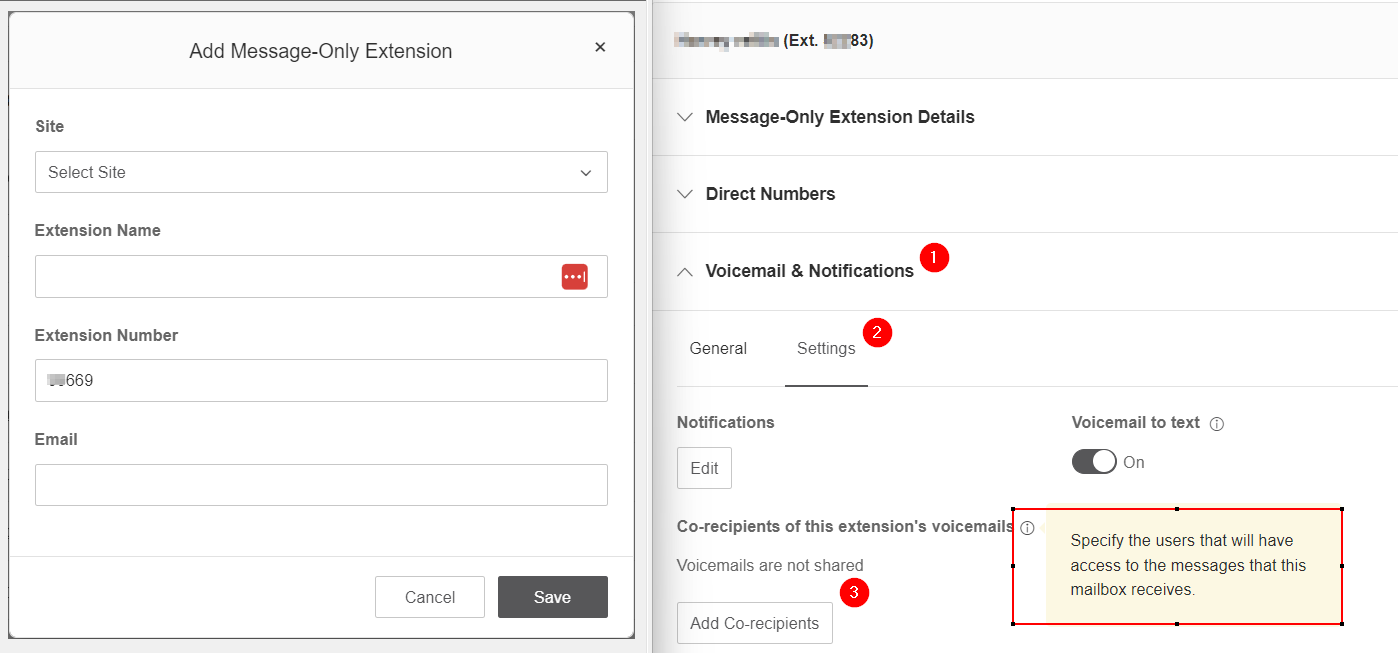
ACO steps outlined for the images included:
1- Navigate to Phone System > Groups > Message-Only Extension
2- Select a Site to assign it to, give a Name, number, and first email address
3- Within the new Extension, navigate to Voicemail & Notifications > Settings > Add Co-recipients
4- Select from the new menu as many other extensions as you would like to have access
4a- The wording "Voicemails are not shared" will now be replaced with a list of selected recipients
Thanks Carlos! -
23 Apr, '24
Rory Trehy AdminHey Jared,
This is submitted as a feature request with Netsapiens. We do not have a planned date for this just yet but will continue to monitor this.
Thank you,
 mlsqudzuwwmme5unun33.png